How We Use WordPress

Chances are you’ve probably heard of WordPress. 35% of the internet’s websites are powered by WordPress. So what makes it such a popular choice for building websites? It is very easy to get a WordPress site up and running quickly, it makes creating and managing a site relatively easy, and can be inexpensive to host and maintain.

WordPress offers a range of features for creating a website and managing its content. At Craft Pixel, we use WordPress only as a content management system. If you’re not familiar with the term, a content management system, or CMS, is about what it sounds like. It allows you to manage the content of your website. Let’s explore what that means.

When we build websites for clients, we need to give them a way to easily add and edit the content on their site. “Content” is a general term, and each client’s content is going to vary depending on their needs. In the case of the Craft Pixel sample site, the content consists of blog posts and store items.

WordPress makes it super easy for our clients to log in, view their site’s existing content, and edit/add to that content. Once they have completed those changes, they simply push a button to publish changes to their site.

To illustrate that process, let’s get a bit meta and see what it’s like to write and publish this blog post. First things first, we have to log in to the WordPress CMS.

Once logged in, we can click on the Posts tab to see a list of blog posts. From here we can see when a post was last edited or published, edit or delete a post, or start to write a new post. Let’s click on the draft of this post to continue writing.

The post editing page gives you all the tools you need to create and edit a blog post. You can easily add many types of content to the post; things like images, quotes, videos, and much more.

Once the post is finished, we simply click the Publish button, and the blog post will automatically be added to the site! Hopefully that gives you a high level overview of what it’s like to create and manage content within WordPress.

As we mentioned before, WordPress isn’t just for managing content like blog posts. We can configure WordPress to manage virtually any type of content! The content could be store items, videos, calendar events, you name it. WordPress is flexible enough to handle it all. We will work closely with you to understand your needs and build your WordPress CMS to make it easily to manage and publish your content, whatever it may be.

WordPress Handles Content, We Handle the Rest

On a traditional WordPress site, WordPress will take your content and build out your site’s front-end (what visitors see). While that may be a good solution if you don’t know how to build a website, at Craft Pixel, we prefer to build the site’s front-end ourselves.

As we’ve explained WordPress is great at managing content, but the websites WordPress can build from that content have their limitations. WordPress is limited on how customizable the site’s styling and interactions can be. An experienced WordPress developer can push the boundaries of customization. But we believe there are better tools for the job that we prefer to use.

At Craft Pixel we use Gatsby to build the site itself. Gatsby pulls in the content from WordPress and builds out the site. This gives us the best of both worlds: an easy-to-use CMS for managing content with WordPress and a super flexible, modern front-end to our site with Gatsby. If you haven’t already, check out our last post to read about some of the excellent features we get from building sites with Gatsby.

That’s it Folks

We hope these blog posts have helped build an understanding of who Craft Pixel is and the quality of work we can provide.

If you think we would be a good fit for building your next website, please reach out. We would love to hear from you!

Meet Gatsby

Here at Craft Pixel, Gatsby is our tool of choice for building client sites. In this post we will cover the features and benefits Gatsby offers that make it the clear choice for many of our sites and projects. But before we dive in, let’s answer the question: what is Gatsby?

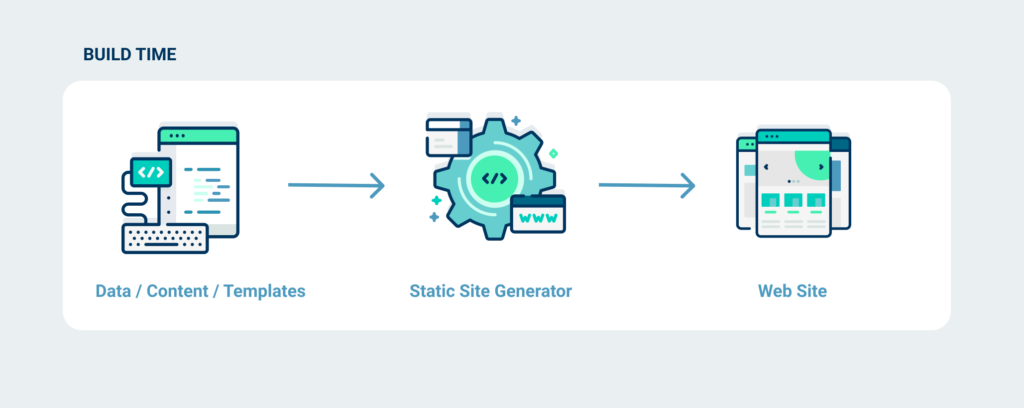
Gatsby is a static site generator that utilizes modern web technologies to build sites that are optimized for speed and security. You may be wondering, what the heck is a static site generator? An SSG builds your site into static files and folders and serves those to users. In contrast, traditional web apps wait until a page is requested and then generate the view each time. An SSG does this in advance so that every view is ready ahead of time.

You may be thinking, if my site is built to static files it probably won’t be very dynamic or interactive, right? Not with Gatsby. Gatsby utilizes React, one of the most flexible and dynamic front-end frameworks. Gatsby simply builds out dynamic pages at build time instead of each time a user visits the page.

So when exactly is “build time”? Builds can occur whenever, on demand. We can set up hooks to trigger a build, whenever you data changes. For example, publishing a blog post in WordPress can trigger a build. That way the site rebuilds whenever the your data changes, keeping the website in sync. Decoupling the site’s architecture in this way gives us some significant benefits and features.

Performance

Building out pages in advance allows the site to be much more performant and fast. Sites load in record time and navigating between pages doesn’t cause the page to refresh. Gatsby also offers additional tools to make our pages load even faster, such as intelligent prefetching and image optimization. Have you noticed how fast pages load when clicking around the sample site?

Scalability

More users, more content, no problem! Other sites have to build their views each time they are requested by a user. If a site like this spikes in traffic it has to keep up with all of these requests, potentially resulting in slow performance or even crashing the site. This is not an issue when the site is built ahead of time! The architecture is optimized for scale out of the box.

Security

Cyber attackers use methods like scripting, database injections, and server-side vulnerabilites to attack websites. This can compromise valuable business data or worse, user data. Only serving static files eliminates many of these threats. Removing the need for servers to perform logic and do work reduces the ability for these servers to be compromised and exploited.

That’s it for now! Hopefully this gave you a better idea of why we use Gatsby at Craft Pixel. Next we will look at WordPress as a content management system.

What is Craft Pixel?

Great question! Craft Pixel is your personal resource for creating professional websites and digital solutions. We provide the same services as an agency, with the ability to handle everything from brand creation to website development and deployment.

Some of our strengths include nimbleness and personal touch. We operate as freelancers with a passion for what we do. We maintain a very low number of clients (ideally one at a time). This allows us to work closely with you, so we can understand your needs and vision, and deliver the best possible end-product.

While we specialize in e-commerce and WordPress-powered sites (checkout our sample site), we also have the range of skills to create more dynamic modern web apps as well.

The Face Behind Craft Pixel

That’s me, Dean Nellis. I have been designing and developing websites for almost to 10 years! Creating the Craft Pixel brand was a way to give face to the services I offer as a freelance designer and developer.

But it’s not just me. I have a network of friends and freelancers who specialize in things like branding, illustration, and motion design, whose expertise I often call upon.

I am confident that we can offer the same quality of work as an agency, with competitive pricing.

Crafting Solutions is our Speciality

We want to make sure you are happy with the product we deliver; not just upon delivery, but for years to come. We will work closely with you to understand your needs and vision. The technology we use allows us to create completely custom sites and solutions, that often aren’t possible using a theme or template. If you can dream it, we can build it.

Handing off the website is just as important as creating the site. We will give you the resources you need to take your site and run with it. Whether that be in-person walkthroughs, video walkthroughs, or documentation; we ensure it is easy for you to maintain and create content for your new website.

If your needs evolve over time, or you need help with your site, we have got your back. We want to ensure you’re happy with your website and remain a client for years to come.

Thanks for Reading!

We hope this post helped you get to know Craft Pixel and what we can offer you. Please reach out to us, if you feel we could be a good fit for your needs. We are always excited to start a new project!

In the coming blog posts, we will be exploring the technologies we used to create the Craft Pixel sample site and what makes them great.